How to save a web page: HTML, PDF or image, compared
October 31, 2026 · 3 min read
To save a web page, press Ctrl + S (Cmd + S on a Mac) in Chrome, or use Save Page As in Firefox and File > Save As in Safari, then choose a format. A complete web page keeps text and images but can break when you open it later; a PDF or an image keeps the page exactly as it looked and opens anywhere.
Ways to save a web page
| Format | How | Keeps the look | Works offline |
|---|---|---|---|
| Web page, complete (HTML + files) | Ctrl + S in Chrome; Save Page As in Firefox | Partly | Yes, while the files stay together |
| Web Archive | Safari: File > Save As > Format > Web Archive | Mostly | Yes |
| PDF (print) | Ctrl + P > Save as PDF | Print layout | Yes |
| PDF or image (screenshot) | Full-page capture | Exactly | Yes |
Save as HTML in Chrome and Firefox
In Chrome, press Ctrl + S to open the Save dialog. Webpage, Complete saves everything Chrome needs to show the page, and Webpage, HTML Only saves just the text and code, without images (Dummies guide).
In Firefox, open the menu and choose Save Page As. Mozilla lists four types: Web page, complete (with pictures, in a separate folder), Web page, HTML only, Text files and All files.
Pages that build their content with scripts, or that need you to be logged in, may not look right when you open the saved copy.
Save in Safari: Web Archive
In Safari, choose File > Save As, then Format > Web Archive to save the page with its graphics, or Page Source for the HTML only. Apple notes that links keep working “as long as the destination webpages are available” and that some pages prevent saving some items.
Save as PDF
Printing to PDF gives you one file that opens on any device. It uses the site’s print layout, which can hide parts of the page. See how to print an entire web page.
Save as a screenshot PDF or image
A full-page capture keeps the page exactly as it looked, including everything below the fold. It’s the best choice for receipts, bookings and anything you may need to show later.
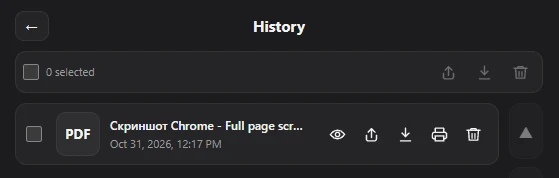
In Chrome, Full page screenshot captures the whole page as PDF, PNG or JPG and keeps every file in History, where you can open, share, print or download it again. The text in the file is part of the image, so it can’t be edited.
For copies that should outlive the website, see how to archive a website.
Questions people ask
How do I download a web page to read offline?
Save it as Webpage, Complete in Chrome or Web Archive in Safari, or save it as a PDF.
Why does my saved web page look broken?
The page relies on scripts or files that weren’t saved, or on your login. Save it as PDF or as a full-page capture instead.
What is the best format to save a web page?
PDF for something you’ll read, share or print; a full-page capture for proof of what the page showed; HTML if you need the code or links.