How to send a screenshot by email, chat or from your phone
October 31, 2026 · 3 min read
The fastest way to send a screenshot is to copy it to the clipboard and paste it straight into the chat or email with Ctrl + V (Cmd + V on a Mac). If the app doesn’t accept pasted images, attach the saved file instead. On a phone, open the screenshot and use the share button to pick the app.
How to send a screenshot: three ways
| Way | How | Best for |
|---|---|---|
| Paste | Copy the screenshot, then Ctrl + V in the message | Chats, email, documents |
| Attach | Save the file, then attach it with the paperclip | Email, forms, support tickets |
| Share | Use the share button in the screenshot tool or photo app | Phones, Windows Snipping Tool |
On Windows
- Paste: PrtSc copies the whole screen and Alt + PrtSc the active window, as Dell’s Print Screen guide explains. In the Snipping Tool, Ctrl + C copies the snip.
- Share: in the Snipping Tool, open the See More menu in the top right and choose Share, according to Microsoft’s guide.
- Attach: snips and Windows + PrtSc captures are saved in Pictures > Screenshots.
More shortcuts for copying are in how to copy a screenshot.
On a Mac
- Paste: add Control to the shortcut (for example Control + Shift + Cmd + 4) to copy instead of saving.
- Drag: drag the thumbnail that appears in the corner straight into an email or a document.
- Attach: screenshots are saved to the desktop by default.
All three are in Apple’s screenshot guide.
On a phone
Open the screenshot in your photo app (or tap the thumbnail right after taking it), tap the share button and choose the app or contact.
Before you send
- Crop and hide private details such as names, emails or order numbers. See how to edit a screenshot.
- Send a long web page as a PDF, not as a very tall image: it’s easier to read on any screen.
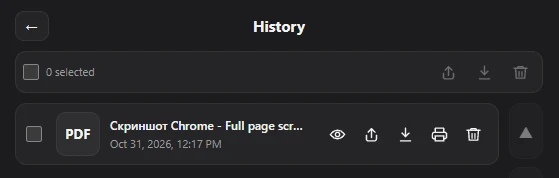
For web pages in Chrome, Full page screenshot has a share button in the dialog that appears after each capture, and again in History, where every capture is kept. Sharing goes through your system’s share menu.
Questions people ask
How do I send a screenshot in an email?
Copy the screenshot and paste it into the message, or save it and attach the file.
Why can’t I paste my screenshot?
Some screenshot shortcuts save a file without copying it. Use a copy shortcut (on Windows, PrtSc; on a Mac, add Control) or attach the saved file.
How do I share a screenshot without saving it?
Copy it to the clipboard and paste it directly into the app. Nothing needs to be saved first.