How to print an entire web page without cutting anything off
October 31, 2026 · 3 min read
To print an entire web page, press Ctrl + P (Cmd + P on a Mac), pick your printer and click Print. That prints the page through its print layout, which can drop menus, backgrounds or whole sections. If you need the page exactly as it looks on screen, capture it first as a full-page PDF or image and print that file.
Two ways to print an entire web page
| Way | What gets printed | Good for |
|---|---|---|
| Browser print (Ctrl + P) | The site’s print version, split into sheets | Articles and text you want to read |
| Print a full-page capture | The page as it looks on screen | Receipts, layouts, proof of what a page showed |
Print a web page in Chrome
Google’s Chrome help describes three steps:
- Click File > Print, or press Ctrl + P (Cmd + P on a Mac).
- In the window that appears, select the destination and change the print settings.
- Click Print.
To get a file instead of paper, choose Save as PDF as the destination. The settings that matter most, such as background graphics and margins, are covered in how to save a whole webpage as a PDF in Chrome.
Why parts of the page don’t print
Websites can define a separate print layout. It can hide navigation, sidebars, pop-ups and even content loaded by scripts, such as comments or product images. Long tables and wide layouts may be cut at the edge of the sheet. That’s the site’s design, and print settings can only partly change it.
Print the page as it looks
Capture the whole page first, then print the capture. Nothing is rearranged, because you print a picture of the page.
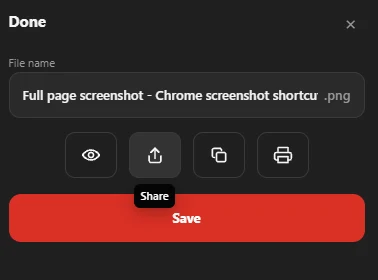
In Chrome, Full page screenshot captures the page as PDF, PNG or JPG. The dialog after the capture has a print button, and you can print any earlier capture again from History. The printout shows the page as it looked on screen; the text in it isn’t selectable.
If you want to keep the page rather than print it, see how to save a web page.
Questions people ask
Why does my printed web page cut off?
The site’s print layout hides or crops some content, or the page is wider than the sheet. Print a full-page capture instead, or choose a smaller scale in the print settings.
How do I print a web page without the ads and menus?
Use the normal browser print and check the preview: a site’s print version can leave out menus and ads.
Can I print a web page to PDF?
Yes. In the print window, choose Save as PDF (Chrome) or the PDF button (Mac) instead of a printer.