Best screenshot app for Mac: free and paid tools compared
October 31, 2026 · 3 min read
The best screenshot app for Mac depends on what you capture. For everyday screenshots, the built-in Screenshot app (Cmd + Shift + 5) is enough. For scrolling captures of any window, Shottr is free and CleanShot X is the paid all-rounder. Snagit suits teams that also use Windows. If you only need whole web pages from Chrome, a browser extension does it without a desktop app.
Mac screenshot apps at a glance
Prices as listed on each official site in October 2026.
| App | Scrolling capture | Price | Best for |
|---|---|---|---|
| Built-in Screenshot app | No | Free | Quick shots of the screen, a window or an area |
| Shottr | Yes, any window | Free, pay what you want | Scrolling captures on a budget |
| CleanShot X | Yes | $35 once (1 year of updates) or $10 per user a month | Heavy daily use, Mac only |
| Snagit | Yes | Paid, see store | Teams on Mac and Windows |
Built-in Screenshot app: start here
Apple’s guide covers the three shortcuts: Cmd + Shift + 3 for the whole screen, 4 for an area and 5 for the toolbar with a timer, a save-folder choice and the floating thumbnail. Add Ctrl to copy to the clipboard instead of saving a file. What it can’t do is scroll: see scrolling screenshots on Mac for the workarounds.
Shottr: free scrolling screenshots
Shottr runs on macOS 10.15 and later. Its site describes scrolling screenshots of “any app, any window”, and the app is free with an optional payment. It’s the first thing to try if the built-in tool falls short and you don’t want a subscription.
CleanShot X: the paid all-rounder
CleanShot X is made only for macOS (13 or later) and has no Windows version, according to its FAQ. It adds Scrolling Capture to the standard modes. The Basic licence is a one-time $35 with a year of updates; Pro is a subscription.
Snagit: for mixed Mac and Windows teams
Snagit works on both macOS and Windows and includes Scrolling Capture. TechSmith sells it per user, with volume pricing for teams of five or more.
For whole web pages: a Chrome extension
If most of your screenshots are web pages (receipts, articles, documentation), you may not need a desktop app at all.
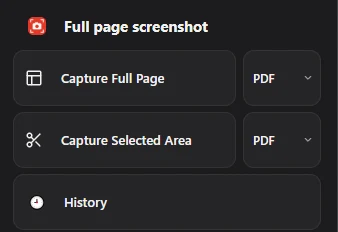
Full page screenshot runs inside Chrome on a Mac. Pick PDF, PNG or JPG, then Capture Full Page or Capture Selected Area, and the file stays in History. It is free and needs no account, but it only captures web pages in Chrome, not other apps or the desktop.
How to choose the best screenshot app for Mac
- Only occasional screenshots: the built-in app.
- Long chats, PDFs or app windows: Shottr first, CleanShot X if you prefer a paid, supported app.
- Mac and Windows in one team: Snagit.
- Mostly web pages in Chrome: a browser extension. For one-off areas, see how to screenshot part of the screen.
Questions people ask
Is there a free screenshot app for Mac with scrolling capture?
Yes. Shottr is free to use and takes scrolling screenshots of any window.
Does CleanShot X work on Windows?
No. Its FAQ says there is no Windows version and no plans for one.
Do I need an app to screenshot on a Mac?
No. Cmd + Shift + 3, 4 and 5 cover the screen, an area and a window. Apps mainly add scrolling capture.