Webpage to PNG: how to save a whole web page as an image
October 31, 2026 · 3 min read
To save a webpage as a PNG of the whole page, use a tool that scrolls the page and joins it into one image. In Chrome, that’s a full page screenshot extension or the DevTools command Capture full size screenshot. Firefox has Save full page in its screenshot tool, and Edge has Capture full page. Online “webpage to PNG” converters work only for public pages, because they load the URL on their own server.
Webpage to PNG: the options
| Tool | Whole page | Formats | Pages behind a login |
|---|---|---|---|
| Chrome extension | Yes | PNG, JPG or PDF | Yes, it captures what you see |
| Chrome DevTools | Yes | PNG only | Yes |
| Firefox screenshot tool | Yes | PNG | Yes |
| Online converter | Yes | Varies | No, it can’t see your session |
In Chrome with an extension
This is the quickest route if you do it more than once.
With Full page screenshot installed:
- Open the page and click the extension icon.
- In the menu next to Capture Full Page, choose PNG.
- Click Capture Full Page. The extension scrolls the page, waits for images that load on the way and joins everything into one file.
- In the Done dialog, rename the file if you like, preview it, copy it to the clipboard or click Save.
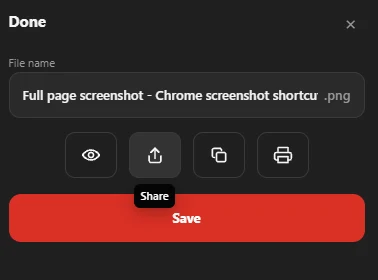
The file also stays in History. The extension works on web pages in Chrome; system pages such as chrome://settings and the Chrome Web Store can’t be captured by any extension.
In Chrome without installing anything
Open DevTools (F12), press Ctrl + Shift + P, type screenshot and run Capture full size screenshot. Chrome saves a PNG to Downloads. The full walkthrough is in how to take a full page screenshot in Chrome.
In Firefox and Edge
- Firefox: press Ctrl + Shift + S, click Save full page, then Download. The file is a PNG (Mozilla’s guide).
- Edge: press Ctrl + Shift + S and choose to capture the full page, then save it.
Online webpage to PNG converters
Converters ask for a URL and return an image. Because their server opens the page, they see the public version only: no logged-in account pages, carts, dashboards or anything behind a paywall you can access. They’re fine for a public homepage, not for your own order history.
PNG or JPG?
PNG keeps text sharp; JPG makes smaller files of photo-heavy pages. See PNG vs JPG for screenshots.
Questions people ask
How do I convert a webpage to PNG for free?
Use Chrome DevTools’ Capture full size screenshot, Firefox’s Save full page, or a free extension such as Full page screenshot.
Can I save a webpage as JPG instead?
Yes. Pick JPG in the extension’s format menu, or save a PNG and convert it.
Why are parts of my webpage PNG blank?
The page loads images only when they scroll into view. Tools that capture in one step can miss them; scroll the page once before capturing, or use a tool that waits for images.