PNG vs JPG for screenshots: which image format to choose
October 31, 2026 · 3 min read
For screenshots, PNG is usually the better format: it’s lossless, so text, icons and interface edges stay sharp. JPG uses lossy compression, which suits photographs and makes smaller files, but it can blur fine lines and leave coloured fringes around letters. MDN’s image format guide puts it simply: PNG is “better for screenshots, diagrams, and line art”, while JPEG is “particularly useful for photographs”.
PNG vs JPG at a glance
| PNG | JPG | |
|---|---|---|
| Compression | Lossless | Lossy |
| Transparency | Yes | No |
| Best for | Screenshots, text, diagrams, interfaces | Photos and images with smooth colour |
| Text and sharp edges | Stays crisp | Can blur or show fringes |
The table follows MDN’s guide to image file types, which recommends lossless encoding “for screenshots, diagrams, logos, and line art” because “blurring and colored fringes around text and sharp edges are very visible”.
When to choose PNG
- Screenshots of apps, websites, settings and error messages.
- Anything with small text you want people to read.
- Images that need a transparent background.
PNG files of photo-heavy pages can be large. That’s the trade-off for keeping every pixel.
When to choose JPG
- Screenshots that are mostly photos, such as a product gallery.
- When the file has to be small, for example to attach to a form with a size limit.
- When slight softness doesn’t matter.
When PDF beats both
For long web pages you want to read, print or send as a document, a PDF is easier to handle than a very tall image. See how to turn a screenshot into a PDF.
Where you choose the format
Most tools pick for you: Chrome DevTools and Firefox’s screenshot tool save PNG. On macOS Tahoe 26 and later, the Screenshot app’s Options menu lets you choose between PNG and HEIF, as described in Apple’s guide. To change an existing file, open it in Preview on a Mac, choose File > Export and pick a format, as Apple explains.
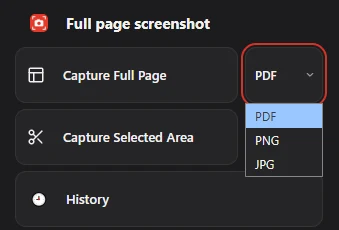
In Chrome, Full page screenshot puts the choice next to each capture mode: pick PNG for sharp text, JPG for a smaller file, or PDF for a document. For saving a whole page as an image, see webpage to PNG.
Questions people ask
Is PNG better quality than JPG?
For screenshots, yes: PNG is lossless, so nothing is lost. JPG discards detail to save space, which shows most on text and sharp edges.
Why is my PNG screenshot so large?
PNG keeps every pixel. Pages with many photos produce big files. Save those as JPG if size matters more than sharpness.
Can I convert a PNG screenshot to JPG?
Yes. On a Mac, open it in Preview, choose File > Export and pick JPEG. On Windows, open it in Paint and use Save as to pick JPEG.