Daily screenshot of a website: 3 ways to track changes
November 3, 2026 · 3 min read
To take a daily screenshot of a website, choose by how much effort you want to put in. For a few pages, capture them by hand each day and put the date in the file name. To be told when something changes, use a monitoring service such as Visualping, which checks pages on a schedule and shows before-and-after screenshots. For full control, run a short script with Playwright and schedule it to run every day.
Daily website screenshots: three ways
| Way | Effort | Works for pages behind a login | Best for |
|---|---|---|---|
| By hand, dated files | A minute a day | Yes | A few pages, proof of what you saw |
| Monitoring service | Set up once | Depends on the service | Being alerted to changes |
| Scheduled script | Set up once, some code | Possible, with extra setup | Many pages, full control |
By hand: a dated capture each day
Open the page, capture it from top to bottom and name the file with the date, for example pricing-2026-11-03.png. Keep the files in one folder so you can flip through them.
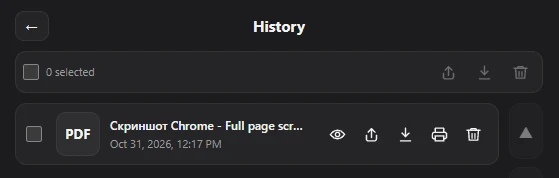
In Chrome, Full page screenshot captures the whole page as PDF, PNG or JPG. Before saving, you can rename the file, for example to add the date, and every capture stays in History so earlier days are easy to find. It captures what you see in your browser, including pages you’re logged into.
With a monitoring service
If you want to know when a page changed rather than look at it every day, use a change monitoring service. Visualping, for example, checks pages on a schedule, compares them visually and as text, and sends alerts with “before and after screenshots with the changed regions highlighted”. Its free plan covers 5 pages; check the pricing page for how often each plan can check.
With a scheduled script
If you’re comfortable with a little code, Playwright takes a full-page screenshot in one line:
await page.screenshot({ path: 'screenshot.png', fullPage: true });Put the date in the file name, then run the script every day with your system’s scheduler: Task Scheduler on Windows, or cron on macOS and Linux. Pages that need a login require extra steps, such as a saved session.
Daily screenshots vs an archive
Daily screenshots show how a page changed over time. To keep a public copy anyone can check later, also save key pages to the Wayback Machine. See how to archive a website.
Questions people ask
How do I automatically screenshot a website every day?
Use a monitoring service such as Visualping, or schedule a Playwright script with Task Scheduler or cron.
Can I get alerted when a web page changes?
Yes. Change monitoring services compare each check with the previous one and alert you; Visualping, for example, highlights the changed regions in before-and-after screenshots.
Is it legal to screenshot a website every day?
Check the site’s terms of use, especially for automated access, and don’t republish content you don’t have rights to. If it matters for your business, ask a lawyer.